Plan an indoor golf simulator around your swing space, ball flight distance and budget. Compare radar, floor-mounted cameras and overhead monitors.
Golf Simulators
0
.bs-golf-buy{box-sizing:border-box;display:inline-flex;flex-direction:column;align-items:flex-start;gap:4px;background:#f8faf5;border:1px solid ...
 panarama
Will a golf simulator work in your room?
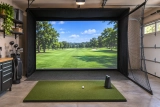
A simulator needs space for three different things. The golfer needs to swing freely, the net or screen needs room to absorb a shot, and the launch monitor needs a clear view of the ball. A room can pass the first test and fail one of the other two. Sketch the bay from above before buying the monitor.
Start at the hitting position
Mark the proposed ball position on the floor. Measure from there to the side walls, the screen and the ceiling. Include anything that sticks into the room, such as a garage door track, a light fixture or an open door. The hitting mat may raise your stance. Use the finished hitting height when checking the space. Follow the enclosure maker’s clearance instructions, including the gap behind the screen.
Plan for everyone who will play. A right-handed golfer and a left-handed golfer stand on opposite sides of the ball. An off-center position that works well for one person can put the other too close to a wall. Mark both stances and compare them with the hitting zone specified for each monitor.
Match the measurement method to the bay
Rear-mounted radar units need space behind the ball as well as ball flight in front of it. Add the two distances from the manual for the exact model, then compare that total with the available lane. A floor camera beside the hitting area uses a different layout. Check which side it occupies and whether it has to move when players change hands. An overhead monitor can leave the floor clear, but its permitted mounting height and hitting zone may rule out a particular ceiling.
Price a complete session
Decide whether you want to practice with a net and a small display or play a projected round with friends. For a projected round, budget for the impact screen, enclosure, suitable projector and any computer the software requires. Check projector throw distance with the planned screen size. For a practice station, identify the measurements you want to review after each shot and which ones work indoors.
Use the floor plan to rule out a poor fit
Suppose your tape measure shows 13 feet from the monitor location to the front of the net. A candidate whose manual calls for eight feet behind the ball and eight feet of ball flight needs 16 feet along that line. Moving the ball toward the net gives the unit more space behind the tee but takes the same amount away from the flight path. Mark both distances on the floor at the same time. Repeat the exercise using the instructions for the next model, including any additional space the net itself requires.
Write down the hardware cost, the included software and any course subscription separately. A golfer who uses only the range and a household that plays weekly rounds may make different choices at the same equipment price. Our indoor golf simulator comparison covers the Garmin Approach R50 and R10, FlightScope Mevo Gen2 and Impact Sports APOGEE, including where each unit sits in the room.

We help you compare the features you’ll use, the extras you’ll need, and what a product will cost to own.